Server-Side Tracking, Pixel Setup & Configuration, Google Tag Manager setup
Server-Side Tracking: The Complete Guide for 2026
Server-side tracking is a method of collecting and routing website event data through a server that sits between your website and the platforms that receive that data — Google Analytics 4, Meta (Facebook), Google Ads, TikTok, and others.
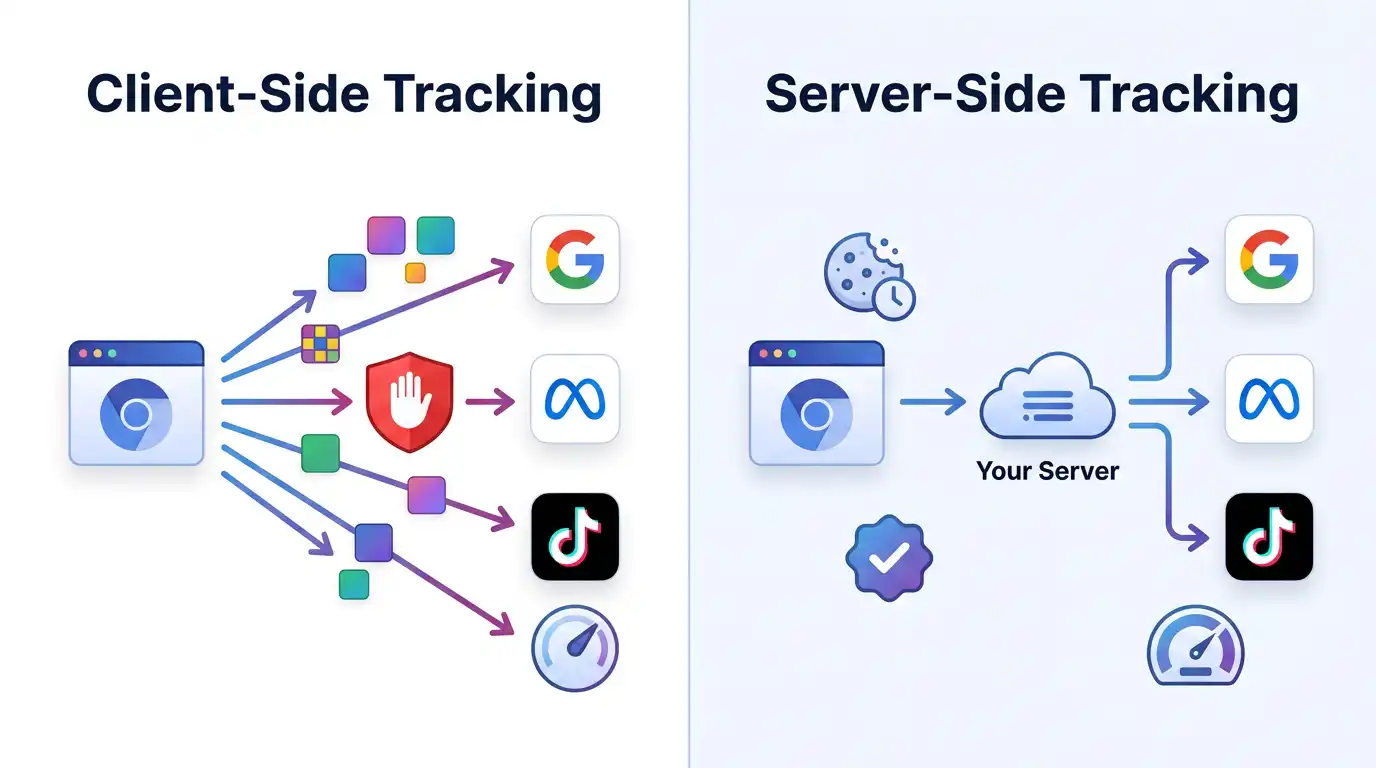
Digital advertising has a data problem. Between ad blockers stripping tracking pixels from pages, browsers quietly shortening cookie lifetimes, and iOS privacy updates reducing the signal advertisers depend on, the old way of tracking — loading scripts directly in a visitor's browser — is losing ground.
Server-side tracking offers a structural solution. Instead of relying entirely on the browser to collect and send data, it moves the heavy lifting to a server you control. The result is more accurate conversion data, better privacy controls, and faster page loads.
This guide explains what server-side tracking actually is, how it works in practice, where it delivers clear advantages, and where it introduces tradeoffs you should plan for. Whether you run a WooCommerce store, manage ad campaigns for clients, or oversee analytics for a growing brand, this is the foundational context you need.
What Is Server-Side Tracking?
Server-side tracking is a method of collecting and routing website event data through a server that sits between your website and the platforms that receive that data — Google Analytics 4, Meta (Facebook), Google Ads, TikTok, and others.
In the traditional approach — often called client-side tracking — JavaScript tags fire directly in the visitor's browser. When someone views a product page, adds an item to cart, or completes a purchase, the browser sends that information straight to each analytics and advertising platform. Every platform gets its own script, and every script runs in the browser.
Server-side tracking changes this architecture. The browser still collects the initial event data, but instead of sending it to five or ten different endpoints, it sends a single stream to a server container that you operate. That server then processes, enriches, filters, and forwards the data to each destination platform according to rules you define.
The most common implementation uses Google Tag Manager Server-Side (sGTM), which provides a server container environment where you can configure "clients" (to receive incoming data) and "tags" (to dispatch data to platforms). Google designed sGTM to pair with the browser-side GTM container, creating a two-tier system where the browser container handles initial data collection and the server container handles distribution.
Why Server-Side Tracking Matters in 2026
Several converging trends have made server-side tracking a practical necessity rather than an optional upgrade.
Ad blocker prevalence has reached a critical threshold. Research consistently shows that 30–40% of web users use some form of ad blocker or privacy-focused browser extension. When a visitor has an ad blocker active, client-side tracking scripts for Meta Pixel, Google Ads tags, and analytics libraries are often blocked entirely. That conversion data simply disappears. Server-side tracking routes data through your own domain (a first-party context), which is significantly harder for ad blockers to distinguish from normal site traffic.
Browser restrictions have shortened cookie lifetimes. Safari's Intelligent Tracking Prevention (ITP) limits third-party cookies and caps the lifespan of JavaScript-set first-party cookies to seven days (or 24 hours in some referral scenarios). Server-side tracking enables you to set cookies from a first-party server endpoint using HTTP response headers, which extends cookie lifetimes to the full duration you specify — typically up to 13 months. This directly improves returning-visitor recognition and attribution windows.
Privacy regulations demand data control. Under GDPR, CCPA, and their successors, businesses are expected to understand and control what data leaves their systems and where it goes. With client-side tags, each third-party script can potentially collect and transmit data according to its own rules — you're trusting dozens of vendors to behave properly. Server-side tracking puts you in the middle: data hits your server first, and you control exactly what gets forwarded, stripped, or anonymized before it reaches any third party.
iOS privacy changes disrupted advertising attribution. Apple's App Tracking Transparency framework, introduced with iOS 14.5, dramatically reduced the data available from mobile Safari and in-app browsers. Meta's Conversions API (CAPI), which relies on server-to-server communication rather than browser-based pixels, was specifically designed to recover this lost signal. Server-side GTM is the most common way to implement CAPI.
How Server-Side GTM Works (Conceptual Overview)
Understanding the architecture does not require deep programming knowledge. The system has four stages.
Stage 1: Browser-Side Data Collection. Your existing GTM web container (or a dataLayer setup) collects event data as visitors interact with your site — page views, add-to-cart actions, purchases, form submissions. Instead of firing separate tags for each platform, the web container sends this data as a single stream to your server container's endpoint.
Stage 2: The Server Container Receives Data. Your sGTM server container runs on a server (cloud-hosted or managed by a provider) under a subdomain of your website, such as track.yourdomain.com. A "client" in the server container — most commonly the GA4 client — parses the incoming data stream and makes it available for processing.
Stage 3: Processing and Enrichment. Inside the server container, you configure tags and triggers just as you would in a regular GTM container, but these run server-side. This is where you can enrich data (adding server-side values like customer lifetime value), filter data (removing PII before it reaches a vendor), or transform data (mapping event names between platforms).
Stage 4: Distribution to Platforms. Server-side tags send the processed data directly from your server to each platform's API — Google Analytics 4 Measurement Protocol, Meta Conversions API, Google Ads Enhanced Conversions, TikTok Events API, and others. These are server-to-server requests that bypass the browser entirely.
The critical infrastructure element is the server that hosts your sGTM container. You can host it yourself on Google Cloud Platform, AWS, or another provider — or you can use a managed hosting service that handles provisioning, scaling, SSL, custom domains, and maintenance for you. Managed hosting is what services like ServerPixel BD and others in this space provide.
Benefits of Server-Side Tracking
Improved Data Accuracy
By routing data through a first-party server, you recover conversions that client-side tracking misses. Businesses that implement server-side tracking commonly report recovering 15–35% of previously lost conversion data. This improvement comes primarily from bypassing ad blockers and extending cookie lifetimes.
Better Ad Platform Performance
When Meta, Google Ads, or TikTok receive more complete conversion data, their optimization algorithms perform better. Meta's documentation explicitly recommends server-side Conversions API implementation alongside browser-side Pixel for the best Event Match Quality scores. Higher match quality typically correlates with lower cost-per-acquisition and better return on ad spend.
Faster Page Loads
Every client-side script that fires in the browser adds to page load time. A typical e-commerce page might load 15–30 third-party scripts. Moving processing to the server means the browser loads fewer (and lighter) scripts, which improves Core Web Vitals — particularly Largest Contentful Paint (LCP) and Total Blocking Time (TBT). This has direct SEO benefits, as Google uses Core Web Vitals as a ranking signal.
Stronger Privacy Controls
With server-side tracking, data passes through your server before reaching any third party. This creates a chokepoint where you can implement consent logic, strip personally identifiable information, anonymize IP addresses, or block data transmission entirely based on the user's consent state. This is substantially more reliable than relying on client-side consent enforcement, where determined scripts could potentially circumvent restrictions.
Future-Proofing
The trajectory of browser privacy is clear: third-party cookies are deprecated or restricted in every major browser. Server-side tracking, built on first-party data and server-to-server APIs, is aligned with where the ecosystem is heading. Investing in this infrastructure now prepares your tracking stack for future changes.
Limitations and Tradeoffs
Intellectual honesty matters here. Server-side tracking is not a magic solution, and you should plan for its real costs and complexities.
Implementation Complexity
Setting up server-side GTM requires understanding GTM's server container configuration, custom domain DNS settings, SSL provisioning, and platform-specific API requirements. If you're comfortable with standard GTM, the server-side container adds a meaningful layer of complexity. This is why many businesses use managed providers or implementation services rather than building from scratch.
Ongoing Server Costs
The server container needs to run continuously. Costs scale with traffic volume — a high-traffic site will consume more server resources. On Google Cloud Platform (self-hosted), costs can be unpredictable and scale with CPU usage. Managed providers typically offer flat or tiered pricing, which is more predictable but carries its own cost structure. Budget this as an ongoing operational expense, not a one-time setup cost.
Event Deduplication
When you run both client-side and server-side tracking simultaneously (which Meta and Google recommend for redundancy), you must implement deduplication to avoid double-counting events. This requires careful configuration of Event IDs that match across both data streams. Misconfigured deduplication is one of the most common server-side tracking implementation errors.
Compliance Is Still Your Responsibility
Server-side tracking gives you better tools for privacy compliance, but it does not automatically make you compliant. You still need a proper consent management platform, clear privacy policies, and a legitimate legal basis for processing user data. The server sees all the data — that means you are responsible for handling it appropriately.
Not All Platforms Support Server-Side Equally
While GA4, Meta, Google Ads, and TikTok have robust server-side APIs, not every advertising platform offers a Conversions API equivalent. Smaller platforms may still require client-side tags. Your server-side implementation supplements but usually does not entirely replace client-side tracking.
GA4 and Server-Side Tracking
Google Analytics 4 was designed with server-side tracking in mind. The GA4 Measurement Protocol allows your server container to send event data directly to GA4 without requiring any browser-side JavaScript for analytics data collection.
Key benefits of GA4 server-side tracking include extended first-party cookie duration (bypassing Safari ITP's 7-day cap), reduced data discrepancies between GA4 and your ad platforms, and the ability to enrich events with server-side data before they reach GA4 — such as customer segment information from your CRM.
The setup involves configuring a GA4 client in your sGTM container to receive data from the browser-side GA4 tag, then adding a GA4 tag in the server container to forward processed events to your GA4 property. Google's documentation covers this configuration in detail, and managed sGTM providers typically include this in their standard setup.
Meta Conversions API (CAPI) and Server-Side GTM
Meta's Conversions API is perhaps the most commercially impactful use case for server-side tracking. CAPI allows you to send conversion events from your server directly to Meta's servers, bypassing the browser entirely.
For e-commerce businesses running Facebook and Instagram ads, CAPI implementation typically improves Event Match Quality scores by providing additional customer information parameters (hashed email, phone, external ID) that the browser-side Pixel alone may not capture — especially when ad blockers or ITP interfere.
Meta explicitly recommends running CAPI alongside the browser-side Pixel (a "dual setup") for maximum coverage, with event deduplication via matching Event IDs. Server-side GTM is the most flexible way to implement this: the browser collects the initial event, the server container enriches it with hashed customer data, and a server-side Meta tag sends it to the Conversions API.
The result, for most e-commerce advertisers, is measurably better ad delivery optimization, more accurate reporting, and improved ROAS.
ServerPixel BD vs Stape.io: Key Differences
Both ServerPixel BD and Stape.io provide managed server-side GTM hosting. They address the same core need — running an sGTM container without managing your own cloud infrastructure — but differ in approach and positioning.
Stape.io is the largest player in the managed sGTM hosting space. It offers a self-serve platform with automated container provisioning, a large library of 80+ server-side tags, power-up features (like cookie keeper and data enrichment), and a usage-based pricing model that bills by server requests. Stape has extensive documentation, integrations with multiple e-commerce platforms, and is well-suited for teams with existing GTM expertise who can configure containers independently. Pricing starts at approximately $20/month for lower traffic, but scales with request volume, which can be difficult to predict. [Source: stape.io, April 2026]
ServerPixel BD takes a more service-oriented approach. Alongside sGTM hosting, it offers hands-on implementation support, managed migration, and setup assistance — targeting businesses that want working tracking infrastructure without necessarily building GTM expertise in-house. Pricing is in BDT with flat monthly tiers (from ৳1,190/mo for a single domain to ৳24,990/mo for enterprise with dedicated VPS), and payment is available via bKash, Nagad, and local bank transfer. This makes it accessible to businesses in Bangladesh and similar markets where international payment methods may be a barrier. ServerPixel BD also develops and sells WordPress/WooCommerce plugins related to tracking and order recovery. [Source: serverpixelbd.com, April 2026]
Who each is best for:
Stape.io is well-suited for technically proficient teams, agencies managing many containers, and businesses that need self-serve tooling with a large integration library and established ecosystem. It is the more mature platform with a longer track record.
ServerPixel BD may be better suited for businesses in Bangladesh (or similar markets) that prefer local-currency billing, want implementation support included, or need a managed setup experience rather than a purely self-serve platform. It is a newer provider, and prospective customers should evaluate reliability, uptime history, and support responsiveness as the service matures. [CONFIRM: ServerPixel BD team should verify which specific features to highlight and add any additional differentiators]
This is not a recommendation of one over the other — it's an acknowledgment that different businesses have different needs.
Get Started
If you're ready to improve tracking accuracy and data control, ServerPixel BD offers managed server-side GTM hosting with setup support.
- Custom subdomain setup
- SSL configuration
- Meta CAPI & GA4 integration
- Ongoing support
Start Free Trial | View Pricing | Learn More
Last reviewed: April 2026
Frequently Asked Questions
$9–$200+/month depending on setup. ServerPixel BD starts at ৳1,190/month.
Tags
Need help with server-side tracking?
Explore ServerPixel BD services, plugins, and tracking solutions to improve data accuracy and marketing performance.