server-side tracking, server-side GTM, Google Tag Manager server-side, GA4, GA4 server-side tracking, Meta Conversions API, Meta CAPI
How Server-Side Tracking Helps with Cookie Loss and Privacy Changes
Cookie restrictions, browser privacy updates, and ad blockers are making traditional tracking less reliable than ever. This guide explains how server-side tracking helps recover lost conversion data, improve attribution, extend first-party cookie usefulness, and build a more accurate tracking setup for GA4, Meta CAPI, and modern ecommerce marketing.
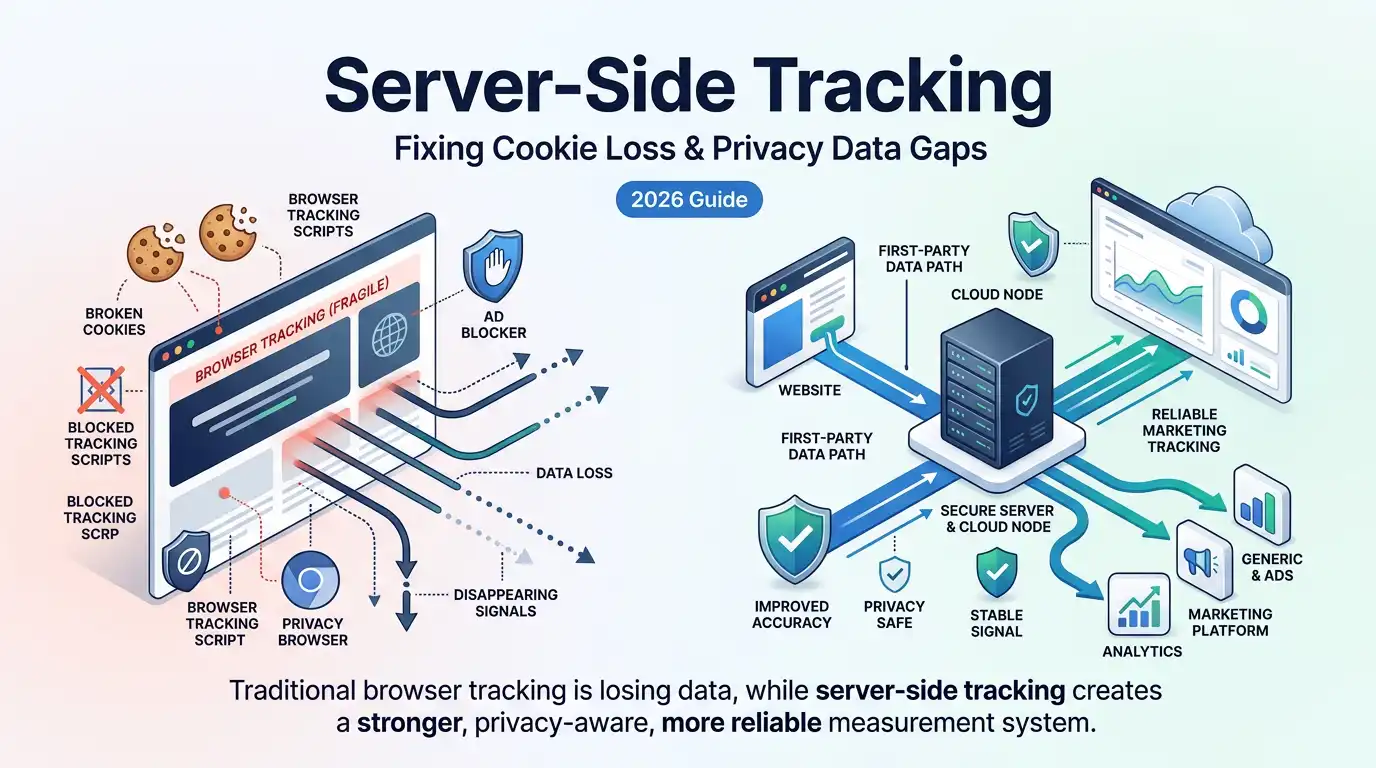
If your conversion numbers do not match reality, you are not alone. Across ecommerce stores, lead generation websites, and paid media campaigns, businesses are quietly losing valuable tracking data every day. What used to be a fairly reliable browser-based setup now breaks under cookie restrictions, browser privacy updates, iOS tracking limits, and ad blockers. The result is simple but painful: fewer recorded conversions, weaker attribution, smaller remarketing audiences, and less confidence in your marketing decisions.
This is one of the biggest reasons server-side tracking has become such an important topic. It is not just a technical trend or a new buzzword in analytics circles. It is a practical response to a real business problem. When traditional client-side tracking becomes less reliable, server-side tracking creates a more controlled and durable way to collect, process, and send data to platforms like Google Analytics 4, Meta Ads, Google Ads, and other marketing tools.
For many businesses, the shift is no longer optional. If you are investing money in paid advertising, relying on conversion reporting, optimizing for ROAS, or trying to understand customer journeys more accurately, then cookie loss is already affecting your numbers. You may not notice it immediately, but it often shows up as missing purchases, unattributed leads, under-reported conversions, or inconsistent reporting across platforms.
In this guide, you will learn what changed in the privacy and browser landscape, why client-side tracking is losing reliability, how server-side tracking helps reduce data loss, and what it actually means for your business. We will also look at the role of first-party cookies, Meta Conversions API, GA4, ad blockers, attribution windows, and the common mistakes businesses make when trying to fix these issues.
Table of Contents
- The Cookie Problem in 2026
- What Is Server-Side Tracking?
- How Server-Side Tracking Solves Cookie Loss
- The Privacy Landscape Driving This Shift
- How Meta Conversions API Uses Server-Side Tracking
- GA4 and Server-Side Tracking
- Real-World Impact: What You Can Expect
- Common Mistakes to Avoid
- Who Should Implement Server-Side Tracking?
- When to Hire an Expert
- Conclusion
The Cookie Problem in 2026
To understand why server-side tracking matters, it helps to start with the real problem: the old way of tracking users across the web no longer works as cleanly as it once did. For years, businesses relied heavily on browser-side scripts, third-party pixels, JavaScript-set cookies, and direct browser requests to advertising and analytics platforms. That setup was easy to deploy, but it also depended on browsers being open and permissive. That environment has changed.
What Actually Changed
Modern browsers have spent the last several years tightening privacy controls. Apple’s Safari led this shift through Intelligent Tracking Prevention, commonly known as ITP. Safari aggressively limits how long certain cookies can survive, especially when it detects patterns associated with cross-site tracking. Firefox also applies stricter privacy controls, and although Chrome has taken a less aggressive path so far, the broader trend is clear: browser environments are becoming more hostile to traditional tracking methods.
At the same time, ad blockers have become much more common. Many users now browse the web with extensions or privacy-focused browsers that block pixels, analytics libraries, and tracking scripts. If your business depends entirely on those browser-side scripts, a meaningful portion of your conversion data never reaches your ad platform or analytics account.
Then there is iOS privacy. Apple’s App Tracking Transparency framework changed how apps and platforms can track users across websites and apps. This had a particularly strong effect on paid media attribution, especially for Meta and similar platforms that depended heavily on browser-side pixel events and mobile identifiers. Even when campaigns were still producing results, the visible reporting often looked weaker because less data was making it through.
Why It Matters for Your Business
These changes affect real business outcomes. Your dashboards may show fewer purchases than your ecommerce platform recorded. Your reported lead volume may look lower in ad platforms than it looks in your CRM. Your remarketing audiences may be smaller than they should be. Your attribution windows may break down because returning users are no longer recognized after a short period.
When data quality drops, decision quality drops too. You might pause campaigns that are actually performing. You might scale the wrong channels. You might think your Meta ads are underperforming when the real issue is that the browser-based setup is failing to record a large share of the conversions you are already getting.
This is why server-side tracking is increasingly seen as infrastructure rather than an optional enhancement. Businesses need a tracking setup that is less dependent on fragile browser behavior and more aligned with the realities of privacy-first web environments.
What Is Server-Side Tracking?
Server-side tracking is a method of collecting and routing website event data through a server that sits between your website and the platforms that receive that data. Instead of sending all event data directly from the browser to tools like GA4, Meta, and Google Ads, the browser sends the event to a server container or endpoint you control. That server then processes, enriches, filters, and forwards the data to each destination.
In a traditional client-side setup, the visitor’s browser becomes the main place where tracking happens. JavaScript tags fire, cookies are set, and requests go directly to third-party servers. In a server-side setup, the browser still plays a role, but it is no longer the single point of failure. The server becomes the central traffic controller for your measurement system.
A common implementation uses server-side Google Tag Manager, often called server-side GTM or sGTM. In that model, a web container helps collect initial browser-side data, and a server container running on your own subdomain receives that data and forwards it to the right platforms. This makes it possible to preserve more signal, apply stronger control, and reduce the amount of reliance on browser-executed third-party scripts.
That architectural change is the key. Instead of letting every vendor collect data directly from the user’s browser in its own way, you build one cleaner pipeline where your infrastructure receives the event first and then decides what gets passed onward.
How Server-Side Tracking Solves Cookie Loss
The strongest value of server-side tracking is that it directly addresses some of the biggest causes of modern data loss. It does not magically solve every problem, but it makes your setup much more resilient in areas where client-side tracking has become weak.
First-Party Cookies Set from Your Server
One major advantage is how cookies can be handled. When cookies are set through JavaScript in the browser, some browsers treat them with suspicion and limit their lifespan. But when a cookie is set via an HTTP response from a server on your own domain or subdomain, it is treated more like a genuine first-party cookie. That changes how some privacy rules affect it.
In practice, this means server-side tracking can often preserve identifiers for longer periods than a browser-only setup. Longer cookie persistence improves returning-user recognition, attribution continuity, and multi-session reporting. That matters when someone clicks an ad today and converts several days later. Without reliable persistence, the relationship between the first click and the later purchase can be lost.
Bypassing Common Ad Blocker Patterns
Ad blockers often stop known third-party scripts and domains. For example, if the browser tries to load a common advertising pixel or analytics library from a known tracking domain, that request can be blocked before the event is ever sent. With server-side tracking, the browser can send data to your own endpoint instead, often on a branded subdomain that looks like a first-party request.
This does not make tracking invisible to every privacy tool, and it should never be used to bypass consent requirements. But from a technical perspective, it does help recover data that would otherwise be lost simply because a browser extension blocked a third-party script call.
Server-to-Server Data Transfer
When your server sends event data directly to a platform’s API, that communication no longer depends on the user’s browser successfully executing and delivering the full event. This is where tools like Meta Conversions API become so valuable. Instead of hoping the browser delivers the event, your server sends it directly. That server-to-server model is much more stable than a browser-only model.
For advertisers, this means more complete conversion reporting. For analytics, it means a cleaner event pipeline. For data control, it means you can standardize and inspect what gets sent before it leaves your environment.
The Privacy Landscape Driving This Shift
Server-side tracking did not become popular in isolation. It grew in response to a broad shift in how browsers, regulators, and platforms think about user privacy.
Safari ITP and Browser Restrictions
Safari is often the most important browser to think about in discussions of cookie loss because it aggressively limits tracking-related storage behavior. If your traffic includes a healthy number of iPhone, iPad, and Mac users, then Safari’s restrictions can have a major effect on your reporting. What used to feel like a seven-day or longer attribution window may collapse much faster when cookies do not survive or users are not recognized consistently.
That is one reason first-party server-set cookies matter so much. A well-configured first-party server-side environment can often preserve identifiers in ways that are more durable than browser JavaScript alone.
Chrome and the Ongoing Privacy Shift
Chrome has not fully removed third-party cookies in the way many expected, but that should not create false confidence. The direction of travel across the web remains privacy-first. Even if one browser slows or adjusts its rollout, businesses still face restrictions from Safari, Firefox, mobile environments, consent enforcement, and user behavior. A tracking strategy built only around the most permissive browser is a fragile strategy.
Regulation and Data Control
Privacy regulations such as GDPR and CCPA do not simply ask whether you track users. They push businesses to understand what data is collected, where it goes, and whether user choices are being honored. Client-side setups often make this harder because multiple third-party scripts run independently in the browser. Server-side tracking adds a control layer. Since data reaches your server first, you can decide what is forwarded, anonymized, reduced, or blocked.
This does not remove compliance responsibilities, but it does give you stronger technical control. That can make a major difference for organizations that take privacy governance seriously.
How Meta Conversions API Uses Server-Side Tracking
Meta Conversions API is one of the clearest practical examples of why server-side tracking matters. For years, many advertisers depended on Meta Pixel alone. But a browser-only pixel is no longer enough for reliable performance measurement in many environments.
Meta Conversions API allows your server to send event data directly to Meta. When paired correctly with the browser Pixel, it creates a stronger combined setup. The browser can still send its version of the event, while the server sends the same event through CAPI. Meta uses event deduplication to avoid double counting when both arrive correctly.
This matters because the browser copy may fail while the server copy succeeds. In other cases, the browser copy may be partial, but the server copy can carry more useful matching data. That can improve event match quality and help Meta’s system optimize ad delivery more effectively.
For ecommerce brands, this can be especially important for purchase events, add-to-cart events, initiate-checkout events, and lead submissions. If your business spends money on Meta ads, a strong Pixel plus CAPI setup is now much closer to best practice than a browser-only setup.
Event Deduplication Matters
Whenever you use both browser and server events together, deduplication becomes essential. Without it, platforms can count the same event twice. That is why consistent event IDs and implementation discipline matter. This is one of the common reasons businesses need experienced help. The concept is straightforward, but execution has to be clean.
GA4 and Server-Side Tracking
GA4 also benefits from server-side infrastructure. When data quality drops at the browser level, analytics becomes less trustworthy. Returning users can be counted as new users, session paths become fragmented, and attribution becomes less reliable.
With server-side tracking, GA4 can receive cleaner and more durable event data. This can help with user recognition, cross-session continuity, and measurement resilience. It also gives you better opportunities to enrich data before it reaches GA4, which can be useful for more advanced reporting and segmentation.
Another benefit is performance. Reducing the number of direct third-party requests from the browser can lighten the client-side footprint. That does not automatically make your site fast, but it can reduce unnecessary browser overhead and make your tracking setup cleaner.
Real-World Impact: What You Can Expect
Businesses usually care less about the architecture and more about the outcomes. The outcomes of a well-executed server-side tracking setup typically show up in four areas.
First, you often recover more conversion signal. This means your ad platform reports become closer to your actual business results. Second, you often improve attribution continuity because users are recognized more reliably over time. Third, your optimization systems work with better data, which can improve campaign efficiency. Fourth, you gain more control over data governance and privacy handling.
It is important to set realistic expectations. Server-side tracking does not eliminate every gap. Some users will still block data. Some privacy scenarios will still reduce signal. Some platforms will still report differently from one another because of attribution model differences. But for many businesses, the improvement is large enough to be clearly worth the effort.
If your business relies on paid traffic, especially across Meta and Google, the difference between weak and strong tracking can translate into meaningful budget efficiency over time.
Common Mistakes to Avoid
One of the biggest mistakes is treating server-side tracking like a simple plugin installation. It is not just a toggle. It is infrastructure. If you set it up badly, you can create new problems rather than solving old ones.
Another common mistake is using both browser-side and server-side event delivery without proper deduplication. That can inflate reporting and damage trust in the system. A third mistake is ignoring consent logic. Server-side tracking should strengthen control, not weaken it. If users have not consented, your setup should respect that.
Some businesses also overcomplicate the first version of their implementation. A more practical path is to start with the highest-value events and platforms, validate them, and expand gradually. Meta purchase tracking, GA4 critical ecommerce events, and key lead events are often the best starting points.
Finally, many businesses fail to maintain the setup. APIs change, platforms evolve, and implementations drift over time. Server-side tracking should be treated as a managed asset, not a one-time task you forget after launch.
Who Should Implement Server-Side Tracking?
Server-side tracking is especially useful for ecommerce brands, agencies, high-spend advertisers, and businesses that care deeply about attribution quality. It is also valuable for organizations with significant Safari or iOS traffic, since these users are often the most affected by browser-side data loss.
WordPress and WooCommerce businesses can benefit significantly because they often rely on plugins, pixels, and browser-side tracking layers that become fragile over time. Shopify stores can also benefit, particularly if they want more reliable purchase and funnel reporting.
If your business is spending money on ads and making decisions based on conversion reporting, then stronger tracking infrastructure is worth serious consideration.
When to Hire an Expert
There is a difference between understanding the concept of server-side tracking and implementing it correctly in production. DNS setup, SSL, custom subdomains, event mapping, data layer validation, Meta CAPI, GA4, deduplication, and consent logic all need to work together. For a technical in-house team, this may be manageable. For many businesses, it is more efficient to work with a specialist.
If your current reporting is already inconsistent, if your purchase events are unreliable, or if your paid media decisions depend on cleaner attribution, then hiring an expert can save both time and wasted ad spend. A professional implementation is often far less expensive than months of decision-making based on poor-quality data.
ServerPixel BD offers tracking-focused services for businesses that want help with server-side GTM setup, Meta Conversions API implementation, GA4 tracking, and cleaner first-party data infrastructure. If you are evaluating whether your current setup is losing data, exploring a professional audit can be a good next step.
Conclusion
Cookie loss and privacy changes are not temporary annoyances. They are structural shifts in how the web works. Traditional browser-only tracking can still capture some data, but it is no longer dependable enough to serve as the sole foundation for serious measurement and ad optimization.
Server-side tracking gives businesses a stronger path forward. By moving critical data routing through a server you control, you reduce reliance on fragile browser conditions, improve first-party data handling, strengthen attribution, and recover conversions that would otherwise be missed.
For businesses running paid media, especially in ecommerce and lead generation, the question is no longer whether privacy changes matter. The real question is whether your measurement setup is strong enough to adapt. If the answer is no, server-side tracking deserves a place in your roadmap.
If you want to improve tracking accuracy, reduce conversion loss, and build a more reliable first-party data setup, ServerPixel BD can help you move in the right direction with practical implementation support, managed hosting guidance, and a cleaner server-side tracking workflow.
Frequently Asked Questions
Cookie loss refers to the erosion of tracking data caused by browser restrictions like Safari ITP, ad blockers, and privacy regulations that limit how long cookies persist or prevent tracking scripts from executing. The result is under-reported conversions, fragmented analytics, and weaker ad platform optimization.
Tags
Need help with server-side tracking?
Explore ServerPixel BD services, plugins, and tracking solutions to improve data accuracy and marketing performance.